



Users

The Spime Difference

A social platform built on Space and Time—where only people who are truly there can participate.

How Spime Works

Discover the features behind Spime’s space-time technology, authentic content, and real-world engagement.

Spimes in Motion

See how Dynamic Spimes adapt to movement, keeping content relevant as people move through space.

User's Guide

Learn how to use Spime—from creating and joining Spimes to posting content and exploring features with confidence.

Pricing

Spime is free to use, with affordable Premium plans for ad-free access, extended Spimes, Dynamic Spimes, and more.

Go Premium

Upgrade your Spime experience with ad-free access, powerful features, and fewer token requirements.

Businesses

Why Spime for Business

An overview of how Spime enables real-time engagement, trusted communication, and new revenue models for organizations and partners.

For Large Organizations

How municipalities, authorities, venues, and institutions use Spime for live communication, public engagement, and monetization.

For Ad Brokers

Purchase ad inventory from organizations and resell it through existing advertiser relationships

For Advertisers

Reach verified, location-present audiences through localized ads, direct partnerships, and transparent performance insights.

Business Portal Features

Explore the tools organizations use to manage Spimes, advertisers, content, and performance through a powerful, intuitive portal.

Investors

Growth & Strategy

Insights into Spime’s long-term strategy, differentiation, and revenue models for investors.

FAQ

Quick answers to common questions about Spime, features, pricing, and how the platform works.

Media Library

Access Spime logos, videos, images, and brand assets for media, partners, and promotional use.

Install App

Get the Spime app for iOS and Android and start sharing real-time, location-based content.

Search This Site

Find pages, features, and resources across the Spime website quickly and easily.

Change Log

Latest updates, new features, fixes, and improvements in Mobile App and Business Portal.

Download app
Download app
Audiences

Users

The Spime Difference

A social platform built on Space and Time—where only people who are truly there can participate.

How Spime Works

Discover the features behind Spime’s space-time technology, authentic content, and real-world engagement.

Spimes in Motion

See how Dynamic Spimes adapt to movement, keeping content relevant as people move through space.

User’s Guide

Learn how to use Spime—from creating and joining Spimes to posting content and exploring features with confidence.

Pricing

Spime is free to use, with affordable Premium plans for ad-free access, extended Spimes, Dynamic Spimes, and more.

Go Premium

Upgrade your Spime experience with ad-free access, powerful features, and fewer token requirements.

Businesses

Why Spime for Business

An overview of how Spime enables real-time engagement, trusted communication, and new revenue models for organizations and partners.

For Large Organizations

How municipalities, authorities, venues, and institutions use Spime for live communication, public engagement, and monetization.

For Ad Brokers

Purchase ad inventory from organizations and resell it through existing advertiser relationships

For Advertisers

Reach verified, location-present audiences through localized ads, direct partnerships, and transparent performance insights.

Business Portal Features

Explore the tools organizations use to manage Spimes, advertisers, content, and performance through a powerful, intuitive portal.

Investors

Growth & Strategy

Insights into Spime’s long-term strategy, differentiation, and revenue models for investors.

About

FAQ

Quick answers to common questions about Spime, features, pricing, and how the platform works.

Media Library

Access Spime logos, videos, images, and brand assets for media, partners, and promotional use.

Install App

Get the Spime app for iOS and Android and start sharing real-time, location-based content.

Search This Site

Find pages, features, and resources across the Spime website quickly and easily.

Change Log

Latest updates, new features, fixes, and improvements in Mobile App and Business Portal.

Blog

$

Contact

$
Media Library - Spime Logo 3D
Share private moments with Hide Exceptions

Jan 3, 2025

Hide from the World—With Exceptions!

Keep your Spime private while granting access to select people, no matter where they are. Learn how to use Spime’s “Hide from the World – EXCEPTIONS” feature.

CATEGORIES:

Balancing Privacy and Connectivity

In another post we explore how to control who sees your Spime. But what if you want to keep your Spime hidden from public view while still allowing select individuals—perhaps friends or family far away—to join?

Imagine hosting a private family gathering. You don’t want it appearing on the Trending or Discover screens, but you’d love for grandparents across the globe to experience the moment in real time. Since your Spime isn’t publicly visible, they can’t find or join it on their own.

Introducing “Hide from the World – EXCEPTIONS”

With this feature, you can hide your Spime from the world while manually granting access to specific users. This means you control exactly who can see and join, even if they’re far away.

How to Enable It

  1. Edit your Spime and enable “Hide From the World”, then tap Update.
  2. Open your Spime settings again—you’ll now see an “Add Exception” link next to the red globe icon.
  3. Select the users you want to grant access.

The users you add as exceptions will now see and join your Spime under "Distant Spimes" on their Dashboard.
Hide Location Exception

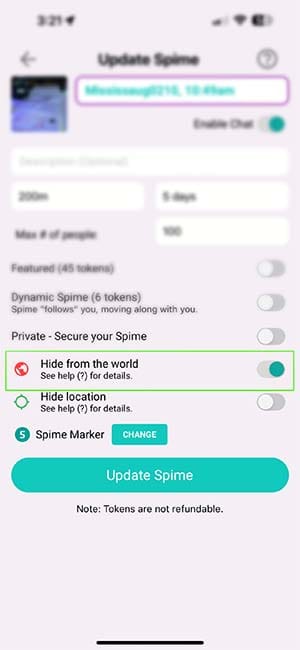
1. Hide from the World

Find your Spime under "Near Me", enter it, and tap the three dots () to edit. Slide "Hide From the World" to ON—the globe will turn red, indicating that your Spime is now hidden from public view. Tap on Update Spime.
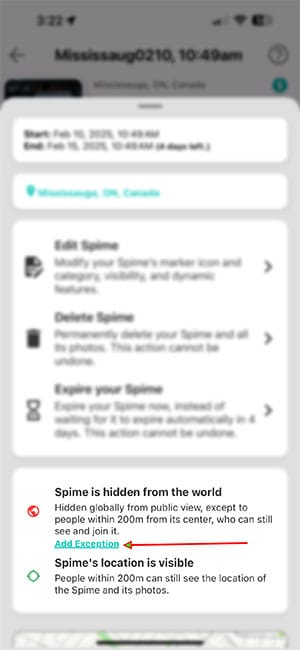
Hide Location Exception

2. Find the "Add Exceptions" Link

Tap the three dots () again and tap on the "Add Exception" link.
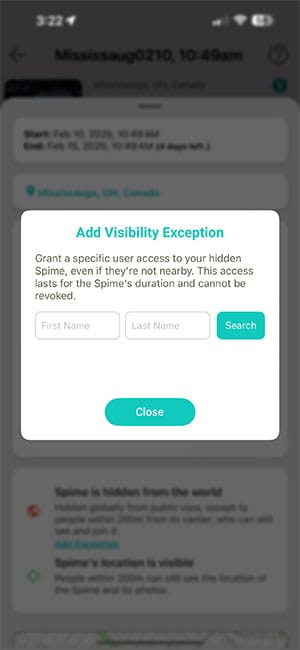
Hide Location Exception

3. Add Exceptions

Enter the first and/or last name of the user you wish to grant an exception to. The name must be entered exactly as it appears in their Spime profile.

Stay Private, Stay Connected

Now, you can share meaningful moments with the people who matter—without making your Spime publicly discoverable. Try it today and take full control of your Spime’s visibility!

0 Comments

Related Posts

Announcing Spime v.3

Spime v.3 Has Arrived!

Discover Spime v.3: A global upgrade with trending feeds, interactive maps, customizable markers, and enhanced privacy controls. Experience authentic, live events – no fake news!