



Users

The Spime Difference

A social platform built on Space and Time—where only people who are truly there can participate.

How Spime Works

Discover the features behind Spime’s space-time technology, authentic content, and real-world engagement.

Spimes in Motion

See how Dynamic Spimes adapt to movement, keeping content relevant as people move through space.

User's Guide

Learn how to use Spime—from creating and joining Spimes to posting content and exploring features with confidence.

Pricing

Spime is free to use, with affordable Premium plans for ad-free access, extended Spimes, Dynamic Spimes, and more.

Go Premium

Upgrade your Spime experience with ad-free access, powerful features, and fewer token requirements.

Businesses

Why Spime for Business

An overview of how Spime enables real-time engagement, trusted communication, and new revenue models for organizations and partners.

For Large Organizations

How municipalities, authorities, venues, and institutions use Spime for live communication, public engagement, and monetization.

For Ad Brokers

Purchase ad inventory from organizations and resell it through existing advertiser relationships

For Advertisers

Reach verified, location-present audiences through localized ads, direct partnerships, and transparent performance insights.

Business Portal Features

Explore the tools organizations use to manage Spimes, advertisers, content, and performance through a powerful, intuitive portal.

Investors

Growth & Strategy

Insights into Spime’s long-term strategy, differentiation, and revenue models for investors.

FAQ

Quick answers to common questions about Spime, features, pricing, and how the platform works.

Media Library

Access Spime logos, videos, images, and brand assets for media, partners, and promotional use.

Install App

Get the Spime app for iOS and Android and start sharing real-time, location-based content.

Search This Site

Find pages, features, and resources across the Spime website quickly and easily.

Change Log

Latest updates, new features, fixes, and improvements in Mobile App and Business Portal.

Download app
Download app
Audiences

Users

The Spime Difference

A social platform built on Space and Time—where only people who are truly there can participate.

How Spime Works

Discover the features behind Spime’s space-time technology, authentic content, and real-world engagement.

Spimes in Motion

See how Dynamic Spimes adapt to movement, keeping content relevant as people move through space.

User’s Guide

Learn how to use Spime—from creating and joining Spimes to posting content and exploring features with confidence.

Pricing

Spime is free to use, with affordable Premium plans for ad-free access, extended Spimes, Dynamic Spimes, and more.

Go Premium

Upgrade your Spime experience with ad-free access, powerful features, and fewer token requirements.

Businesses

Why Spime for Business

An overview of how Spime enables real-time engagement, trusted communication, and new revenue models for organizations and partners.

For Large Organizations

How municipalities, authorities, venues, and institutions use Spime for live communication, public engagement, and monetization.

For Ad Brokers

Purchase ad inventory from organizations and resell it through existing advertiser relationships

For Advertisers

Reach verified, location-present audiences through localized ads, direct partnerships, and transparent performance insights.

Business Portal Features

Explore the tools organizations use to manage Spimes, advertisers, content, and performance through a powerful, intuitive portal.

Investors

Growth & Strategy

Insights into Spime’s long-term strategy, differentiation, and revenue models for investors.

About

FAQ

Quick answers to common questions about Spime, features, pricing, and how the platform works.

Media Library

Access Spime logos, videos, images, and brand assets for media, partners, and promotional use.

Install App

Get the Spime app for iOS and Android and start sharing real-time, location-based content.

Search This Site

Find pages, features, and resources across the Spime website quickly and easily.

Change Log

Latest updates, new features, fixes, and improvements in Mobile App and Business Portal.

Blog

$

Contact

$
Media Library - Spime Logo 3D
Spime Settings

Aug 17, 2024

How to Create the Perfect Spime

A guide on how to create the perfect Spime and make your experience as seamless and enjoyable as possible.

CATEGORIES:

Spime is revolutionizing the way we connect and interact in real-time by offering instant, location-based social engagement. Unlike traditional social platforms that rely on friend requests and invitations, Spime allows you to effortlessly connect and share moments with those around you.

To help you get the most out of this innovative platform, here’s a guide on how to create the perfect Spime and make your experience as seamless and enjoyable as possible.

You can customize your Spime's settings either when you create it, or later by editing it.

Choose the Right Thumbnail and Name

When creating a Spime, the first step is to take a snapshot of your surroundings to serve as the Spime’s thumbnail. This image is what other users will see on the main screen, so it’s crucial to choose one that accurately represents your Spime’s purpose. For instance, if you’re at a birthday party, take a picture of the birthday person. If your Spime is centered around a city tour, snap a photo of a prominent landmark. Remember, you can always change the Spime's avatar later, but the initial impression matters.

Similarly, the name of your Spime should be descriptive and clear. It should immediately convey what the Spime is about, making it easy for others to understand and join in on the experience.
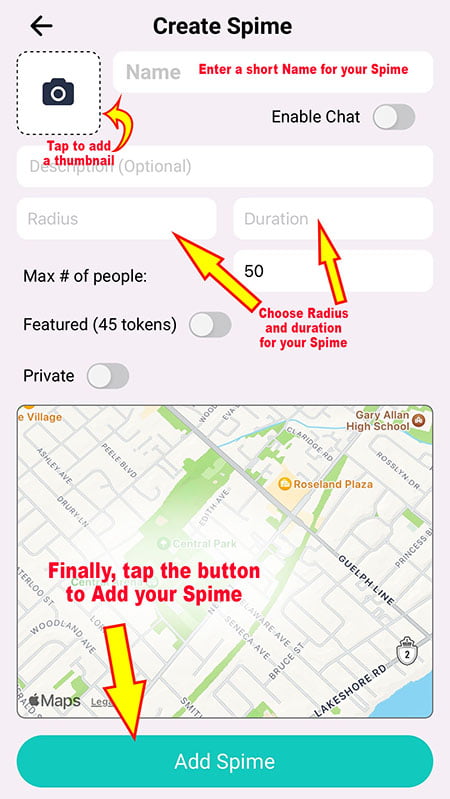
Create Spime

Define the Radius Wisely

One of the unique features of Spime is the ability to define a radius, determining how much area your Spime covers. For example, if you set a radius of 100 meters, your Spime will encompass a 100-meter circle around the location where it was created. For intimate gatherings, like a backyard party, a smaller radius (e.g., 50 meters) is ideal to keep the event private. On the other hand, if you’re on a city tour with a dispersed group, a larger radius will ensure everyone can participate.

Without using tokens, you can set the radius up to 200 meters (500 meters for Premium members), but you can extend it up to 3 kilometers with tokens. Premium members also benefit from reduced token requirements for these extensions.

Set the Appropriate Duration

The duration of your Spime determines how long it remains active. For events like a birthday party, set the duration to match the event’s length to avoid post-event confusion. When the event ends, the Spime should also expire to prevent people from entering or posting photos for an event that has concluded.

Spimes can last up to one day for free (5 days for Premium members), but you can extend the duration to 30 days with tokens. Once a Spime expires, it’s automatically archived, making it accessible to those who followed it during its active period.

Tailor the Number of Participants

Choose a participant limit that aligns with your event’s scale. For a small home gathering, a limit of 20 people might be appropriate. This feature adds another layer of security, ensuring only invited guests can join. Without tokens, you can accommodate up to 250 people (500 for Premium members), with the option to expand using tokens.

Lock-down your Spime

For added security, Spime offers features to control who can access your Spime. This is particularly useful for private or sensitive events.

Enable Chat

Spime also allows you to enable a chat room, facilitating real-time conversations within the Spime. To enable the Chat Room in your Spime, simply tap on "Chat" on the Spime creation or editing screen.

You can enable or disable the chat at any time. If you disable it, all existing chats are saved and will reappear when you re-enable the chat. For example, as a teacher, you can allow your students to ask questions during class via the chat. If they misuse it, you can temporarily disable the chat and re-enable it once they agree to follow the rules.

If You Are on the Move

If you are on a train, a cruise ship, touring a city with friends, etc., enable the Dynamic feature on your Spime. This will allow the Spime to follow you wherever you go, keeping you and everyone around you within its boundaries.

Follow this link to learn how Dynamic Spimes allow real-time sharing with friends even when they are far from you.


By following these guidelines, you’ll maximize your Spime experience, creating an engaging, secure, and tailored environment for all your social interactions. Whether you’re hosting a party, leading a tour, or organizing a class, Spime’s customizable features ensure you have the perfect setup for any occasion.

0 Comments

Submit a Comment

Your email address will not be published. Required fields are marked *

Related Posts